Home
RadioBOSS Web Online Help Prev Page Prev Page
Introduction
License agreement
How to register
RadioBOSS. Quick start
Operation
Broadcasting Internet radio
Scheduling playback
Event options
Scheduler commands
Enabling the microphone
Cart wall
Working with a linear input
Winamp DSP plugins
Using different types of files
Using Track list
Creating a music library
Generating a playlist
Using Playlist Generator Pro
Editing tags
Converting to other formats
Options
General
File types
Playback
Miscellaneous
FX
Microphone/Line-in
View
Silence detector
Converter
Broadcast
Log files / reports
Video
User interface
Top menus
File
Edit
View
Playlist
Music library
Jingles
Settings
Help
Toolbar
Toolbar
Control panel
File explorer
Search
Information
Scheduler
FX
Plugins
Crossfade
Playlist window
Playlist window
Player
Player
Contacts
RadioBOSS Help System

Edit

Edit

Previous topic Next topic  

Edit

Previous topic Next topic  

The Edit menu allows users to edit a playlist, such as cut, copy, paste and delete playlist items.
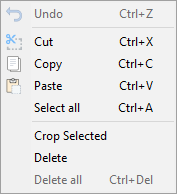
 

top_menus_edit_1


Description of menu entries:


Undo

Undo a recent operation

Cut

Cut a selected file to clipboard

Copy

Copy a selected file to clipboard

Paste

Paste a file from clipboard

Select all

Select all files

Crop selected files

Crop selected files

Delete

Delete a selected file

Delete all

Delete all files


More information:

Generating a playlist


Converted from CHM to HTML with chm2web Pro 2.85 (unicode)