RadioBOSS is distributed on a try-before-you-buy basis. You can download a trial version of the application and use it for free during the trial period. To continue using RadioBOSS after the trial is over, you must buy a registration key.
To register RadioBOSS, follow the steps below:
1. Go to www.djsoft.net and click the Buy button.
RadioBOSS is available in three editions. For details, please see the comparison table: http://www.djsoft.net/enu/radioboss_editions.htm (You can upgrade your edition any time at no additional cost.)
Once your order is submitted and processed, a message with the registration data will be sent to your email address specified during the registration.
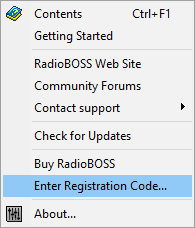
2. Open RadioBOSS, and select Help -> Enter Registration Code... in the top menu bar.
3. A dialog prompting you to enter a registration key will open:
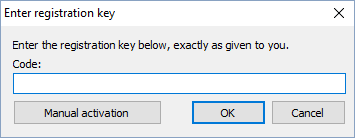
4. Enter your registration key. It is advisable to copy and paste the code from the email message.
If you lost your license code, please visit this link to restore it: https://www.djsoft.net/enu/resendlicense.htm
5. Click OK. Now your copy of the application is registered and all limitations are removed.
If you have upgraded your edition (e.g. from Express to Standard), repeat steps 1 to 5 for the changes to take effect.
More information: