The Playlist menu allows users to perform operations on a playlist.
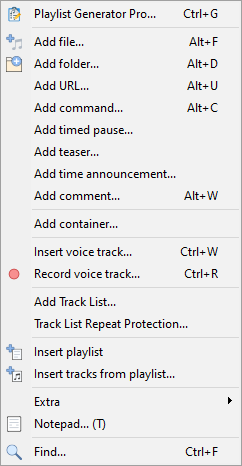
Description of menu entries:
Playlist Generator Pro... |
|
Add file... |
Add a file to the playlist |
Add folder... |
Add all tracks from a specified folder to the playlist |
Add URL... |
Add an URL address to the playlist to play a network stream or podcast |
Add command... |
Add a command to the playlist |
Add timed pause... |
Add timed pause (a window will open where you can set the duration) |
Add teaser... |
Add Teaser |
Add time announcement... |
|
Add comment... |
Add comment to the playlist. Comments are for the convenience only, they are not played. |
Add Line Input... |
Add a line input to the playlist. This menu item will be hidden if no device is selected for Line.In in Settings |
Insert playlist |
Insert a playlist to the current playlist - the playlist will appear as one track and will be opened up on playback |
Add tracks from playlist... |
Add tracks from a playlist to the current playlist |
Insert voice track... |
Insert voice track into playlist, voice tracks are recorded using Voice Track recording tool |
Record voice track... |
Open Voice Track recording tool |
Add Track List... |
Add Track List |
Track List Repeat Protection... |
Configure no-repeat rules for Track List feature |
Extra |
|
Add Text-to-Speech... |
|
Add DTMF tone generator |
Add DTMF tone generator. |
Show Duplicates |
Show duplicate tracks in the playlist. Option |
Show nonexistent files |
Mark non-existent files in the playlist |
Shuffle |
Shuffle tracks in the playlist |
Reload tracks information |
Force reloading tags and additional information for all tracks in the playlist. |
Copy to folder... |
Copy selected files to a folder. If all tracks in a playlist are selected, copied tracks will have a number (track number) in the file name. This way, you can keep the same track order in the folder as in the playlist. |
Delete files from disk |
Delete selected files from disk. Use with care |
Playlist Generator... |
(deprecated) Open old Playlist Generator |
Reset played state |
Reset "played" state for tracks in the playlist window |
Sweeper repeat protection |
Repeat protection for scheduler Sweepers |
Notepad...(T) |
Open Notepad to add note to the track. The note will pop up every time the track is played. Right-click the notepad window to change its mode of operation (per-track note or sticky note). |
Find... |
Search in playlist |
More information: