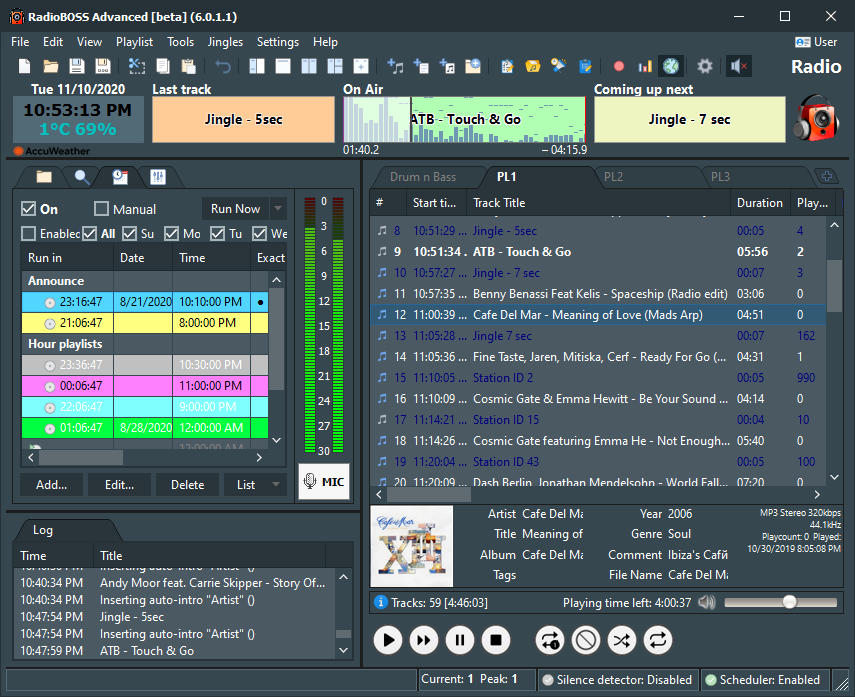
RadioBOSS allows users to customize the look of a playlist window, change fonts and colors, change time and track title format (12/24 hour) and more
To customize view settings, follow these steps:
1. On the top menu bar, select Settings > Options...
2. Click View.
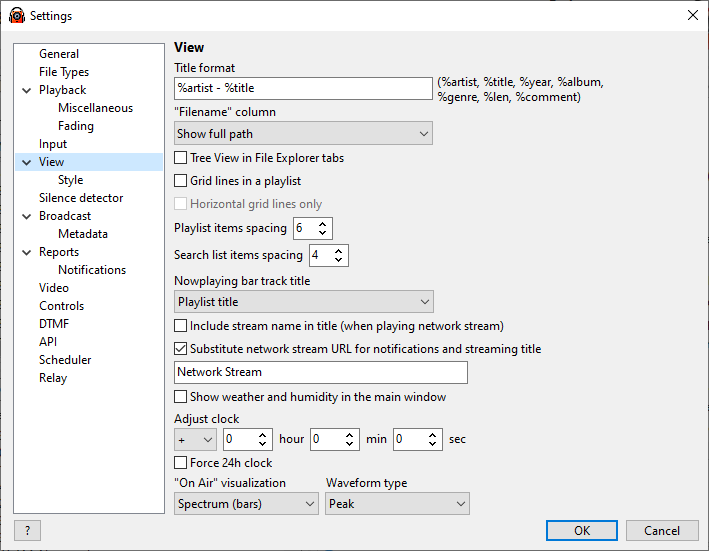
Title format |
Track title format in the playlist. For example, if you want to include album information, you may use this string: %artist - %title - %album |
"Filename" column |
Select what "Filename" column in the playlist should display. |
Playlist items spacing |
Setup playlist items spacing. |
Grid lines in a playlist |
Show grid lines in the playlist. |
Horizontal grid lines only |
When grid in a playlist is enabled, show only horizontal grid lines. |
Highlight item under mouse cursor |
Select item under mouse cursor. |
Search list items spacing |
Setup search list items spacing. |
Include stream name in title (when playing network stream) |
When playing an Internet stream include its title. If unchecked, only the track title will be displayed. |
Substitute network stream URL |
Change the stream URL to the text specified when sent in notifications and nowplaying updates. |
Force 24h clock |
Turn this on if you want to have clochs in 24 hour format. Otherwise it uses operating system format. |
Show weather and humidity in the main window |
Show weather and humidity information in the main window. Click on the label to change temperature units (Celsius or Fahrenheit). Retrieving weather data. |
Adjust clock |
Allows to adjust clock for RadioBOSS - it affects time display and scheduled events. |
"On air" visualization |
Visualization style in the "Now playing" bar. Waveform type sets how the waveform is built: using the average or peak levels of a music track. |
Turn off visualization/level display |
Turn this on to reduce CPU usage. |
You can change the program's appearance in the "Style" section.