В окне «Кроссфейды» можно задать точку микширования, а также параметры автоподъема и автозатухания для музыкальных и других файлов.
Чтобы открыть это окно в меню нажмите Настройки > Кроссфейды.
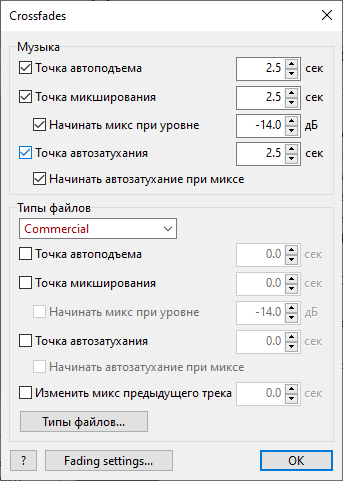
Элементы управления и опции:
Точка автоподъема |
Интервал в начале трека, на протяжении которого громкость линейно нарастает от 0 до 100%. |
Точка микширования |
Интервал в конце трека, когда (с наложением) начинается воспроизведение следующего трека. |
Начинать микс при уровне |
Опция «Начинать микс на уровне» основана на уровне громкости звука (по умолчанию –14 дБ). При использовании этой опции необходимо также включить опцию «Точка микширования».
При включенной опции параметр «Точка микширования» (по умолчанию 2,5 сек.) задает минимальную длительность перекрытия треков. |
Точка автозатухания |
Интервал в конце трека, на протяжении которого громкость уменьшается. |
Начинать автозатухание при миксе |
Если эта опция включена, то автозатухание будет запущено одновременно с микшированием; при этом параметр «Точка автозатухания» задает длительность автозатухания. |
Выбор типа файла |
Выбор типа файла, для которого будут меняться настройки кроссфейда. |
Изменить микс предыдущего трека |
Опция контролирует на сколько трек будет наложен на предыдущий. Функция полезна для рекламных роликов и джинглов во избежание длинных наложений с предыдущим музыкальным треком. |
Раздел Типы файлов |
Кроссфейды для типов файлов имеют собственные значения. Для каждого типа файла можно настроить свои параметры кроссфейдов. |
Подробнее: