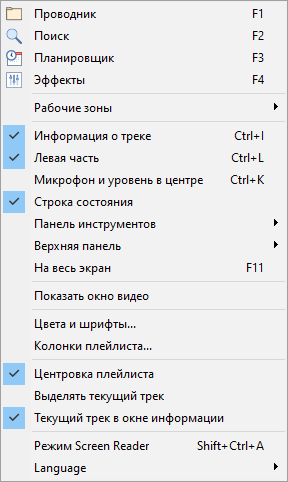
Пункты меню:
Проводник |
Показать проводник |
Поиск |
Показать поиск |
Планировщик |
Показать планировщик |
Эффекты |
Показать вкладку эффектов |
Рабочие зоны |
Установить количество рабочих зон. Рабочие зоны могут быть использованы для поиска, Web-браузера, карт-машины и т.п. |
Информация о треке |
Спрятать/показать панель информации о треке. |
Левая часть |
Спрятать/показать левую часть окна |
Микрофон и уровень в центре |
Спрятать/показать микрофон и уровень в центре |
Строка состояния |
Спрятать/показать строку состояния |
Панель инструментов |
Спрятать/показать панель инструментов |
Верхняя панель |
Полный размер/минимум/спрятать верхнюю панель |
На весь экран |
Сделать программу на весь экран |
Цвета и шрифты... |
Изменить цвет и шрифт плейлиста |
Колонки плейлиста... |
Придать форму колонкам плейлиста |
Центровка плейлиста |
Автоматически прокручивать плейлист до играющего трека |
Выделять текущий трек |
Выделять/не выделять текущий трек при воспроизведении |
Текущий трек в окне информации |
Если включено, при запуске трека окно информации будет содержать информацию о текущем треке |
Режим Screen Reader |
Включить/выключить режим Screen Reader |
Language |
Выбрать язык интерфейса |