Планировщик позволяет запустить трек, плейлист или выполнить действие в заданное время.
Нажмите правой кнопкой на заголовке таблицы чтобы выбрать колонки в списке.
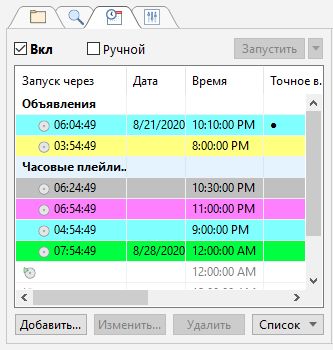
Назначение кнопок:
Вкл |
Включить и выключить планировщик. Неактивная (серая) опция означает, что планировщик был отключен командой «scheduler off». |
Ручной режим |
Ручной режим работы планировщика: задания не будут запускаться автоматически; для запуска задания следует выделить его в списке и щелкнуть по кнопке «Запустить». |
Запустить |
Принудительно запустить выделенное задание |
Добавить... |
Добавить задание |
Изменить... |
Редактировать задание |
Удалить |
Удалить задание |
Список |
Работа со списком |
Сохранить |
Сохранить список заданий в файл (.sdl) |
Загрузить |
Загрузить задания из файла (.sdl) |
Печать |
Печать списка заданий |
Импорт |
Добавить задания в список из выбранного файла (.sdl) |
Очистить |
Удалить все задания |
Колонки в списке:
Запустится через |
Оставшееся время до запуска запланированного задания |
Дата |
Дата запуска запланированного задания (опционально) |
Время |
Время запланированного запуска |
Сразу |
Статус опции «Запустить сразу» («+» — включено, «–» — отключено) |
Поверх |
Статус опции «Воспроизвести поверх эфира» («+» — включено, «–» — трек будет включен в основной плейлист) |
Уровень отключения |
Уровень громкости плейлиста при выполнении задания с включенной опцией «Воспроизвести поверх эфира» |
Файл |
Имя файла и путь к файлу в имени файла или команде |
Имя |
Название задания |
Дополнительно