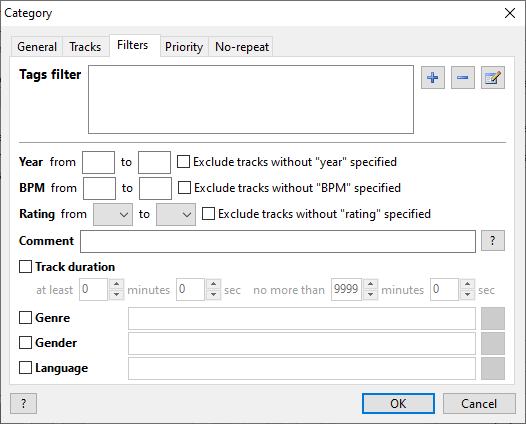
On the “Filters” tab, you can set additional filters for tracks, such as year, rating, and track duration. Filter values work inclusively.
Tags filter
Rules to filter tracks by Tags. To pass the filter, a track must match all defined rules.
Filter by year
For the year filter, you can use now and prev, which are the current and previous years, respectively.
Filter by comments
It is recommended to use the Tags filter instead of the comment filter. The comment filter is an obsolete feature we keep for backward compatibility.
One or several words are defined in the filter. If any of them is found in a track's comments, the track will pass the filter. You can also define mandatory words using the REQUIRE keyword. Exclude tracks using the NOT keyword. Keywords in track tags should be separated with a comma (,) or semicolon (;): slow, moody, 80s.
For example: bass, synth, REQUIRE 90s, NOT slow - select tracks containing bass or synth in comments, definitely contain 90s and do not contain slow. |
Filter by genre
One or more genres are defined for track selection. To select several genres, list them with commas: pop, rock (in this case, Pop or Rock tracks will also be in the category). Tracks without a genre are excluded.
Filter by gender
Filter tracks by the "Gender" field. You can specify multiple options by separating them with a comma.
Filter by language
One or more languages are specified for track selection. To specify multiple languages, separate them with commas.