Control playlist playback.

The button style can be changed in the View section of the settings page.
Seeking: the track playback position can be changed by right-clicking on the "On air" window.
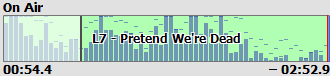
Color indication in the OnAir window: red vertical line shows Mix point, blue bars at the beginning and end - fade in/fade out, pink bars - intro and outro.
Description of player controls:
|
Previous track |
|
Play the selected track |
|
Next track |
|
Pause playback |
|
Stop playback |
|
Repeat the current track. Right-click this button for additional options. |
|
Stop playback after the current track. Right-click this button for additional options. |
|
Shuffle playback order. Attention! If your playlist contains tracks from the scheduler, random playback order won't work: tracks will be played in order! |
|
Repeat the playlist |
|
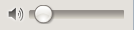
Volume control. |


More information: